
Core48aii gives you a structured AI workspace so your projects stop collapsing into messy conversations.
Built to work with Core48aii’s built-in AI, ChatGPT, Claude, Gemini, Cursor, or any AI tool.
Windows EV code signed • Local workspace • Easy export
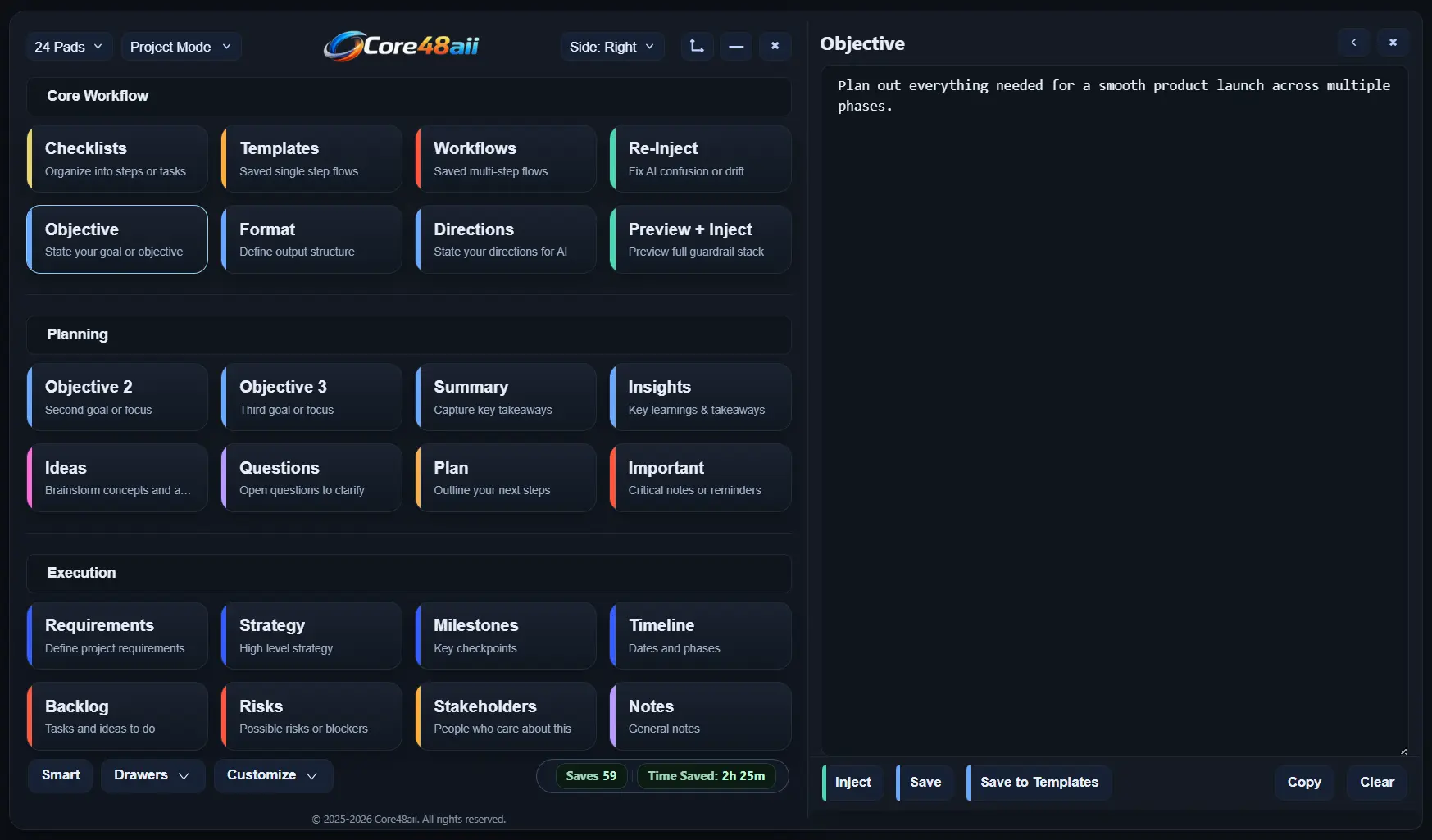

Core48aii is currently looking for early testers who use AI for real projects, writing, research, content, coding, planning, or client work.
The early tester version includes 90 days of access in exchange for honest feedback.
If it looks like a fit, I’ll reach out personally with setup details.
.svg)
Long threads, scattered ideas, and important details get lost.
.svg)
You keep rewriting the same prompts over and over.
.svg)
Starting over, searching, and re-explaining drains hours.
.svg)
The longer the conversation, the easier it is for AI to drift.
Prompt libraries are where prompts live.
Core48aii is where prompts work.
Objective → Format → Directions → Inject
Start by laying out what matters in each core pad. Your Objective tells AI what you want to achieve. Your Format is how the AI output should look. Your Directions are the rules and constraints AI must follow.
Before sending anything, use the Preview + Inject pad to see your full instruction stack exactly as it will be used. Your objective, format, and directions are shown side by side, and edits can still be made if needed.
When you’re ready, click into any text field or AI chat, then press Inject. Core48aii places your prepared instruction stack directly into the active text box, whether it's an AI tool or another app.
Run your structured instructions inside Core48 and replace chat-based AI with a system you control.
Objective → Format → Directions
→ Use Core48aii's AI
Core48aii's built-in AI "Ava" uses structured workflows when you need precision, or quick prompts when you don’t. Your work doesn't drift or reset, and your instructions stay consistent.
Ava uses a relevance system for each task to pull in what actually matters from your user profile, added context, and uploaded files. No more guessing what part of your work the AI considers important.
Build a system you can return to anytime. Every response from Ava can be saved, organized, or reused within your workspace. Highlight key ideas and turn outputs into checklists, notes, and more.

Core48aii stores your workspace on your computer. Core48aii does not host your project database on its own servers.

Your work is not locked in. Export your project data whenever you need to back it up, move it, or reuse it elsewhere.

Core48aii is EV code signed for Windows, helping verify the publisher and improve trust during installation.

Anything you send to AI is shared with the AI service being used. Core48aii helps you choose and prepare what gets sent.
Core48aii keeps your work structured, reusable, and ready to run.
No resets. No lost context. No wasted time.
Core48aii is currently a desktop Windows application.
We’re actively working on the macOS version.
Join the list to get early access when it launches.
Everything you need to know about the Core48aii Early Tester Trial.
Core48aii is a structured AI workspace for people who use AI on real projects. Instead of keeping project instructions, notes, drafts, research, and workflows buried across old chats, Core48aii gives you a reusable workspace of pads for objectives, formats, directions, checklists, templates, project context, and more. You can use it with Core48aii’s built-in AI "Ava", or alongside tools you already use like ChatGPT, Claude, Gemini, Cursor, Google Docs, Word, email, and almost any text field.
Traditional chats are linear and easy to lose control of. Instructions drift, formats get ignored, and you end up spending time repeating yourself. Core48aii keeps your key instructions visible in separate pads and lets you preview exactly what will be sent before you inject it into any AI tool. Instead of hoping the model remembers what you said 20 messages ago, you restate your rules in a structured way every time.
Core48aii is built for people who work with Ai for complex projects: writers, content creators, product builders, founders, and power users who want control, not chaos.
Core48aii is most useful if you juggle writing, research, content, business, software, or multi-step workflows. The pad layout lets you keep everything visible at once instead of buried in separate docs, folders, and chats.
Founder Trial testers get free 90-day access to Core48aii in exchange for honest feedback. The trial includes access to the app, 8 / 16 / 24-pad layouts, Project Mode, Writer Mode, templates, workflows, checklists, validator tools, backups, exports, and 300 included Ava AI runs. Core48aii also works with external AI tools like ChatGPT, Claude, Gemini, Cursor, and other apps. External usage is unlimited.
I’m looking for honest feedback from people who actually use AI for projects. That can include bugs, confusing parts of the app, feature ideas, workflow friction, onboarding feedback, unclear wording, or anything that made you stop and think, “this should work differently.”
You do not need to write a formal review. Practical feedback is the goal.
Core48aii includes built-in AI assistant called Ava.
Ava can work with your structured instruction stack, project context, profile settings, and uploaded source files. Instead of relying only on long chat history, Ava is designed to use the most relevant information for the task you are working on. You can use Ava for quick prompts, structured project work, drafting, organizing, refining, or continuing work from your Core48aii workspace.
No. Core48aii includes built-in AI called Ava, but you do not have to use it.
You can use Core48aii as a structured workspace for building reusable instructions, organizing project context, and injecting clean prompts into external tools like ChatGPT, Claude, Gemini, Cursor, or other AI apps. The 300 included Ava runs are there so testers can try the built-in AI workflow too.
One Ava AI run is one “Send to AI” request inside Core48aii.
For example, if you send a structured instruction stack to Ava, that counts as one run. If you send a quick prompt to Ava, that also counts as one run. Using Core48aii to inject prompts into external tools like ChatGPT, Claude, Gemini, Cursor, Google Docs, Word, or email does not count against your Ava runs.
Core48aii will still work with external AI tools without usage limits.
If you want more built-in Ava usage, additional AI runs are available for purchase. We may also provide extra Ava runs to active testers who are sharing useful feedback, reporting bugs, or helping improve the product.
Yes. Core48aii is currently a Windows desktop app. A Mac version may be considered later if there is enough demand, but this Founder Trial is currently for Windows users.
Your local data is not deleted when the trial ends. All your pads, templates, workflows, checklists, notes, and backups remain on your device. The app becomes read only. You are still able to export all of your data out of the app at any time.
If you decide to subscribe later, Core48aii will unlock around the workspace you already built so you can keep going from where you left off.
Your content stays on your device. Pad contents, templates, workflows, checklists, and settings are stored locally, and snapshot backups are written to a folder in your Documents directory.
Core48aii does not upload your writing, prompts, or projects to a cloud service or use them for analytics. The only network calls are subscription license checks that do not include your content.
Yes. Core48aii includes a backup and export system. It automatically saves snapshots of your workspace to a folder on your machine, and you can restore any snapshot from Settings when needed. You can also export templates, workflows, metrics summaries, and backup files so you have portable copies or can move them to another device.
After the 90-day Founder Trial, you can decide whether Core48aii is useful enough to keep using. The purpose of this trial is feedback, not pressure.
Early tester feedback will help improve the app, fix bugs, simplify confusing parts, and shape what gets added before a wider release. For founders and testers who actively contribute useful feedback and want to continue using Core48aii, I’m open to offering discounted early-supporter pricing.
Inside the app you can open Settings → FAQ for the full in-depth guide that walks through every pad, drawer, and feature.
For technical issues, please contact support@core48aii.com.
I am always happy to help.